Product Video Player

$100

The PluginPartner Video Player Extension empowers Magento 2 store owners to showcase engaging product videos directly on product detail pages. Videos enhance the shopping experience, boost conversions, and help customers make more informed purchase decisions.

30 Days Free Support

The PluginPartner Video Player Extension empowers Magento 2 store owners to showcase engaging product videos directly on product detail pages. Videos enhance the shopping experience, boost conversions, and help customers make more informed purchase decisions.

Why Choose PluginPartner Video Player?

  • ? Engage Customers – Autoplay, loop, captions, and start-time settings make videos more interactive. 
  • ? Flexible Gallery Placement – Display videos as the first item, last item, or via a pinned modal button. 
  • Accessibility Compliance – Upload VTT caption files and provide keyboard navigation support. 
  • ? Track Engagement – Integrated GA4/GTM events: play, pause, 25%, 50%, 75%, complete. 
  • ⚙️ Global + Per-Product Control – Define defaults in system configuration and override settings per product. 
  • ? Responsive Design – Lightweight and fully responsive on desktop and mobile. 

Key Features

  • Add MP4 / WebM product videos directly from admin. 
  • Set per-product overrides (autoplay, loop, start time, poster image). 
  • Upload VTT caption files for accessibility. 
  • Configure global defaults via Magento admin. 
  • Choose video placement in gallery: 
    • First 
    • Last 
    • Pinned (modal button) 
  • Track video engagement with GA4/GTM integration. 
  • Easy keyboard controls: play, pause, seek. 
  • SEO-friendly with title & description fields for each video. 

Admin Configuration

After installing the module, configure it globally:

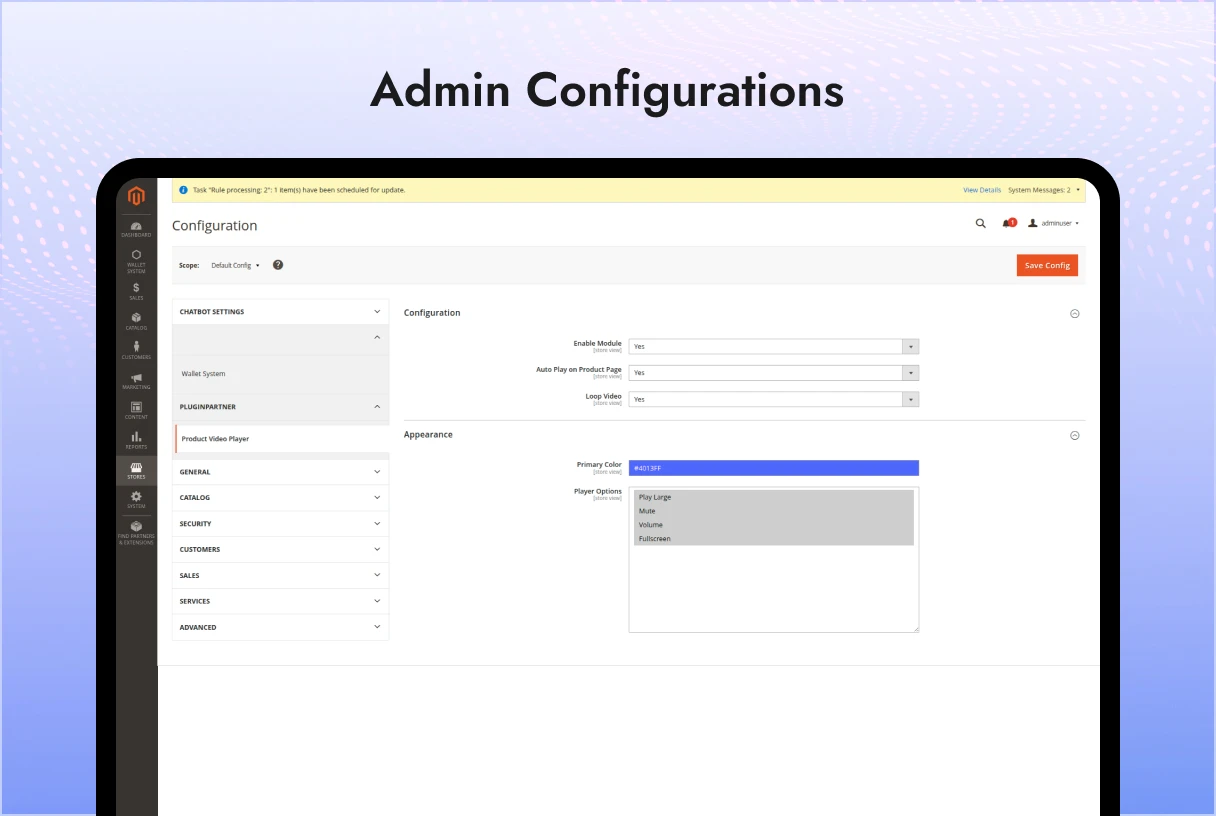
 Path: Stores → Configuration → Plugin Partner → Video Player

Options available:

  • Enable/Disable Autoplay 
  • Enable/Disable Loop 
  • Set Global Start Time 
  • Default Poster Image 
  • Default Video Placement: First / Last / Pinned 
  • Module Information (version, details) 

These settings apply store-wide unless overridden at product level.

Add/Edit Product Page

When editing or creating a product:

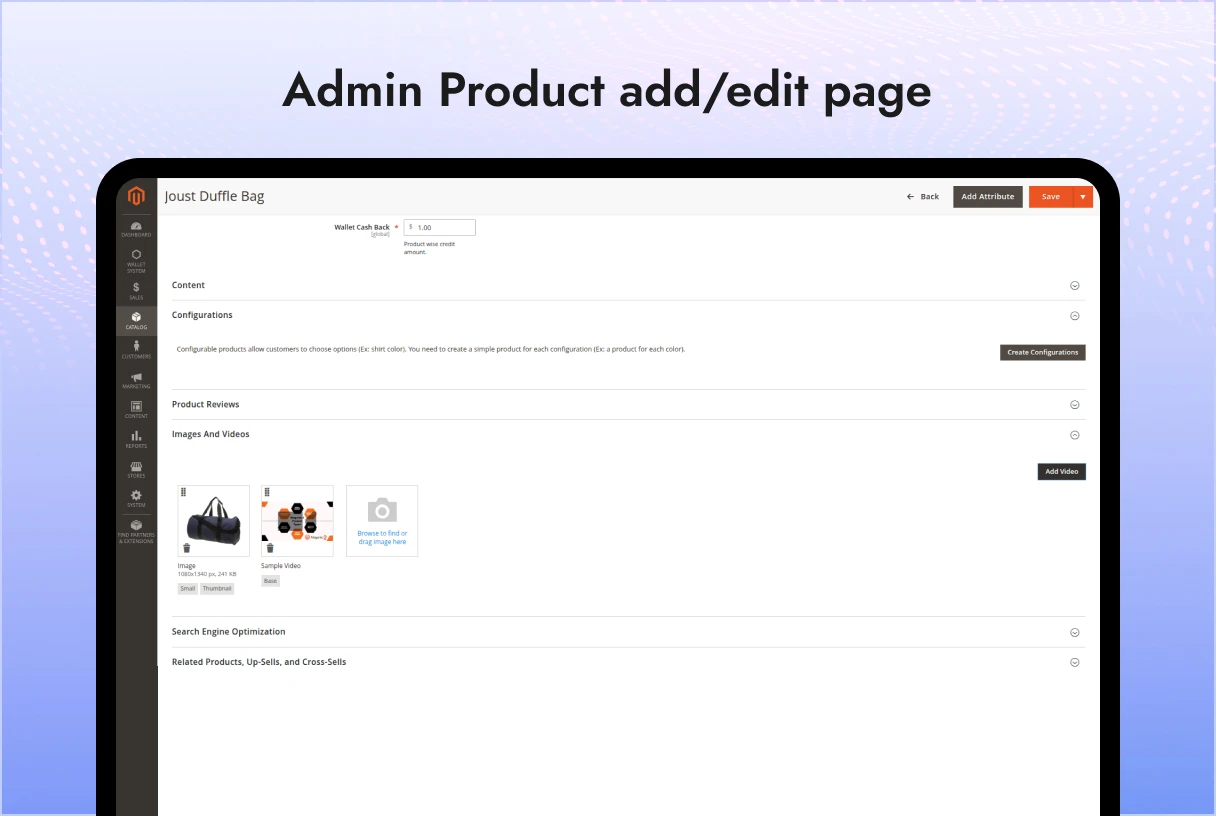
 Path: Catalog → Products → Edit → Images & Videos

Video Setup

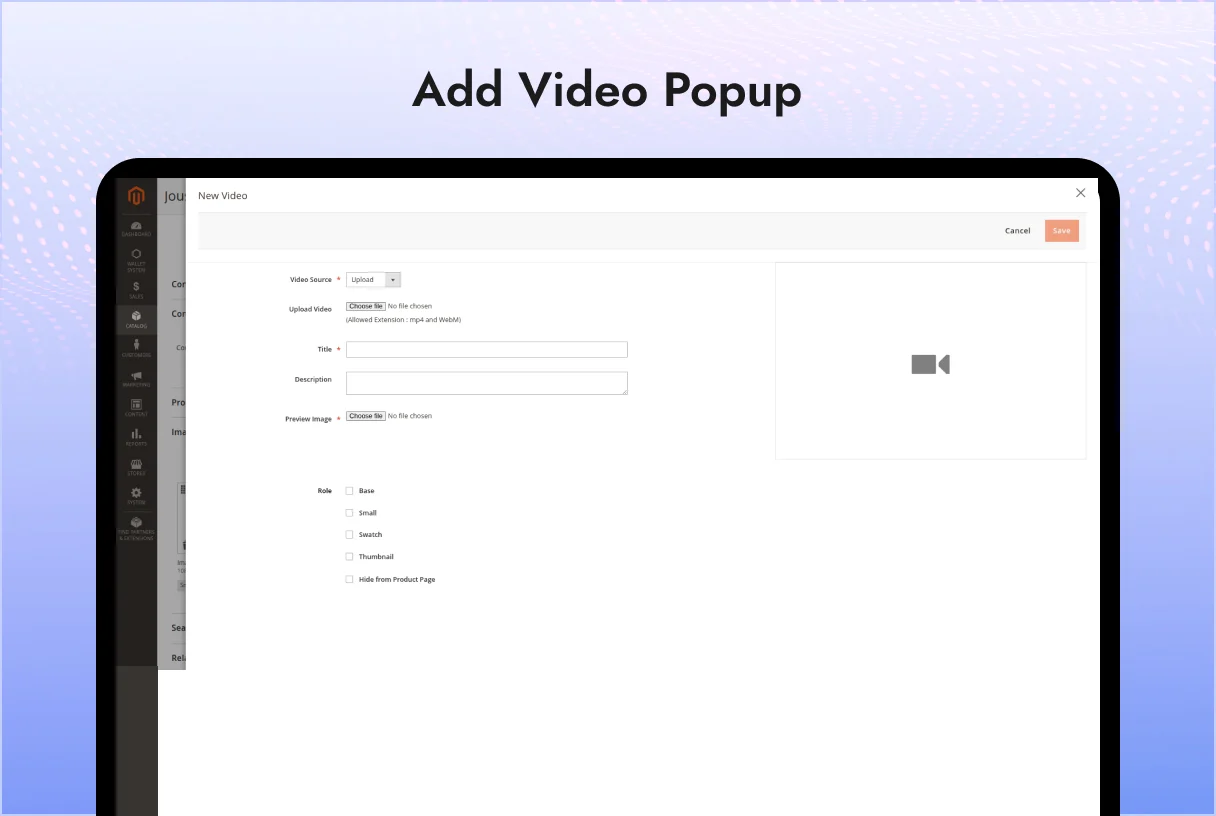
  • Click Add Video 
  • Choose Video Source: Upload file (.mp4, .webm) or external URL. 
  • Enter Title & Description (SEO benefit). 
  • Upload Preview Image (poster). 
  • Assign Role: 
    • Base 
    • Small 
    • Thumbnail 
    • Swatch 
  • Upload VTT Caption File (optional). 
  • Override autoplay, loop, start time, poster, or placement. 

 Flexible per-product overrides give full control.

 Frontend Workflow

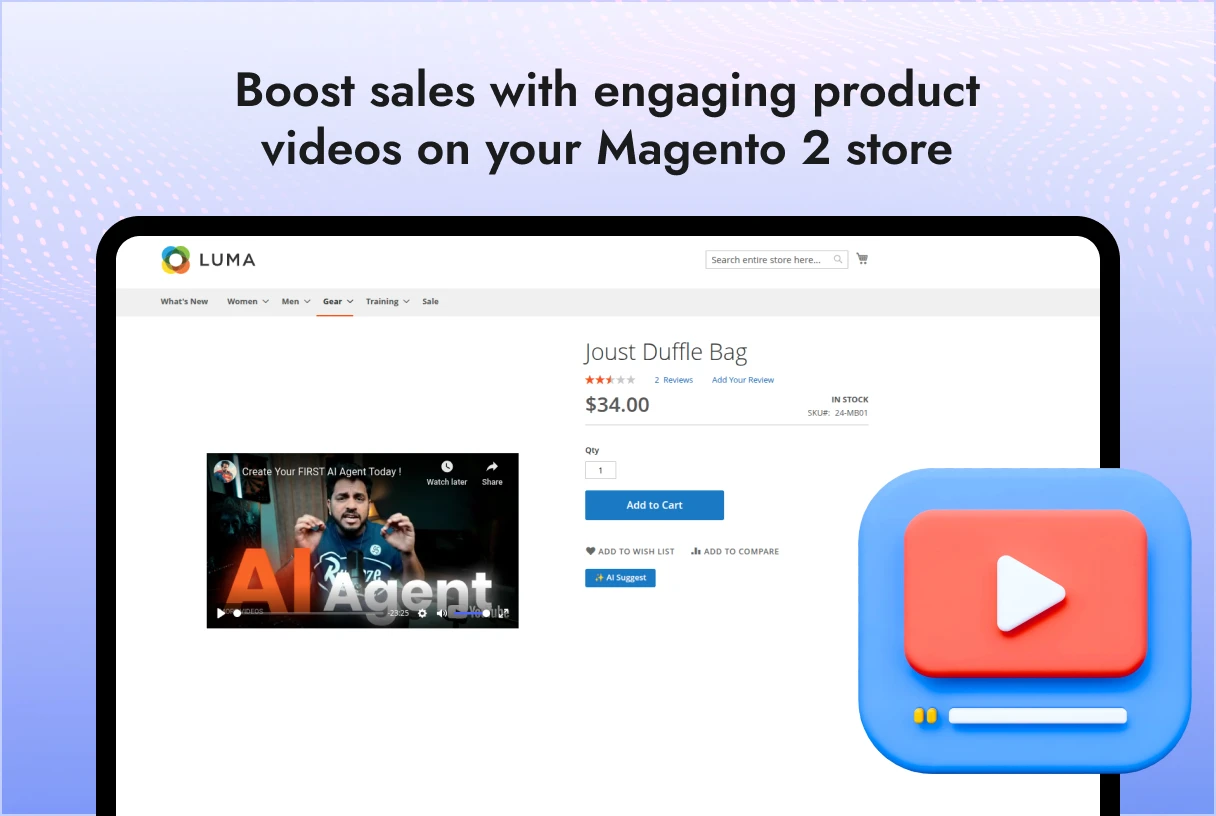
  • Videos display in product gallery based on admin choice: 
    • First Item – Before images 
    • Last Item – After images 
    • Pinned – Floating video button opens modal 
  • Customers can: 
    • Play, pause, fullscreen, seek 
    • Watch with captions (default ON if uploaded) 
    • Navigate using keyboard shortcuts 

 Fully responsive on desktop & mobile.

 Engagement Tracking

  • Integrated with Google Analytics 4 (GA4) & Google Tag Manager (GTM). 
  • Captures events automatically: 
    • Play 
    • Pause 
    • 25%, 50%, 75% progress 
    • Video Complete 

Data flows to dataLayer for marketing analysis.

Business Benefits

  • ? Boost Conversions – Videos improve buyer confidence & reduce returns. 
  • ? Improve SEO – Increased time-on-page & engagement signals. 
  • Accessibility Compliance – Stay inclusive with captions & keyboard navigation. 
  • ? Data-Driven Insights – Refine product presentation using analytics. 

Example Use Cases

  • Fashion & Apparel – Show how clothing fits, style tips. 
  • Electronics – Demonstrate unboxing, setup, and features. 
  • Furniture – Highlight installation or in-room view. 
  • Sports & Fitness – Show workouts, usage guides.

Technical Details

  • Compatibility: Magento 2.4.x + PHP 7.4/8.x 
  • File Support: MP4, WebM (videos) | VTT (captions) | JPG/PNG (poster images) 
  • Responsive: Works seamlessly across devices 
  • Lightweight: Optimized to not slow down product page 

 Installation & Setup

  1. Install the module via composer or upload manually.
    Run setup commands:

    bin/magento setup:upgradebin/magento setup:di:compile

    bin/magento cache:flush


  2. Navigate to Stores → Configuration → Plugin Partner → Video Player. 
  3. Configure global settings. 
  4. Edit products and add videos under Images & Videos. 

 Frontend Experience

  • Customers see product videos directly in gallery or pinned modal. 
  • They can play/pause/fullscreen. 
  • Captions auto-enable for accessibility. 
  • Analytics events fire automatically. 

Conclusion

The Magento 2 Product Video Player by PluginPartner is the easiest way to enrich product detail pages with engaging videos. By combining flexibility, accessibility, and analytics, this module not only improves customer experience but also directly contributes to higher sales and conversions.

Add a review
Product Video Player Product Video Player
Rating*
0/5
* Rating is required
Your review
* Review is required
Name
* Name is required
Add photos or video to your review
4.2
Based on 5 reviews
5 star
20
20%
4 star
80
80%
3 star
0%
2 star
0%
1 star
0%
Anonymous
Anonymous
Verified ownerVerified owner
4/5
10 months ago
Anonymous
Anonymous
Verified ownerVerified owner
5/5
10 months ago
Anonymous
Anonymous
Verified ownerVerified owner
4/5
10 months ago

Frequently Asked Questions -

Product Video Player

+ Features
– Bug Fixes

## [5.0.0] – 2025-09-19
+ Initial public release for Magento 2.4.x
+ Per-product overrides: autoplay, loop, start time, poster
+ Captions (VTT) and basic accessibility improvements
+ Gallery placement control (first / last / pinned)
+ GA4/GTM events: play, pause, 25% / 50% / 75% / complete

Recommended For You

We analyze your business, customer journeys, and competitors to define a clear roadmap. Using AI insights, we recommend premium Magento 2 extensions and pricing packages that drive ROI and long-term success.

We have introduced a new AI Content Generator Module that seamlessly integrates...

$100

The Magento 2 Microsoft Clarity Connector Module allows store administrators to easily...

$100

The Magento 2 SMS Notification Extension by PluginPartner® empowers store owners to...

$178

Our TechScribe

We analyze your business, customer journeys, and competitors to define a clear roadmap. Using AI insights, we recommend premium Magento 2 extensions and pricing packages that drive ROI and long-term success.

From idea to implementation

Unlock Smarter E-Commerce

Magento continues to evolve with each release, bringing enhanced performance, stronger security, and improved features for merchants and developers. The release of Magento 2.4.8 introduces critical security patches, platform enhancements,...
Newsletter popups are the most effective way of generating leads on Magento 2. This guide...

Slow-loading product images are bad for SEO, UX, and conversion. Discover tried and tested solutions...